Friday, 4 November 2016

CTF Writeup - Flare-On 2016 - 04: flareon2016challenge


  • Name - flareon2016challenge
  • Category - Reverse Engineering
  • Points - 4
  • Description - n/a
  • Binary - Download here

The binary for this challenge is a dll and hence we have to do some static analysis before we decide what to do next. The library exports functions flareon2016challenge_1() all the way up to flareon2016challenge_51(). Most of them perform actions on byte_10007014 buffer and return a value. For example flareon2016challenge_7() looks like this:

signed int flareon2016challenge_7()
{
    byte_10007014[dword_10007010-- % 0x10u] -= 79;
    return 16;
}

And flareon2016challenge_47() looks like this:


signed int flareon2016challenge_47()
{
    char v0; // cl@1

    v0 = __ROL1__(byte_10007014[dword_10007010 % 0x10u], 4);
    byte_10007014[dword_10007010-- % 0x10u] = v0;
    return 20;
}


If we chain the return values we get the following: 30 -> 15 -> 42 -> 18 -> ... -> 35 -> 1 -> 51. The only 2 exported functions which are not part of this chain are flareon2016challenge_49() and flareon2016challenge50(). These will come into play later. Lets see what happens when we call the functions in the chain using the C program below:

int main(int argc, char* argv[])
{
    FARPROC func;

    HINSTANCE dllHandle = LoadLibraryA("flareon2016challenge.dll");
 
    if (dllHandle == NULL)
        return 0;
 
    // Start from function 30
    int next_func = 30;

    // Go through chain of functions
    while (1)
    {
        printf("Calling function %d\r\n", next_func);
        func = GetProcAddress(dllHandle, next_func);
        next_func = func();
        if (next_func == 51)
        {
            printf("Calling function %d\r\n", next_func);
            func = GetProcAddress(dllHandle, next_func);
            func();
            break;
        }

    printf("Press Any Key to Continue\n");
    getchar();
    return 0;
}


The first thing we notice is the following:


The most important thing though happens in the function which is called at the end, namely flareon2016challenge_51():

int flareon2016challenge_51()
{
    char v1; // [sp+0h] [bp-90h]@1

    sub_10001530(16);
    sub_10001000((int)&v1, (int)&unk_10007060, (int)&unk_10007060, 6672);
    return printf(aPlayMeASongHav);
}

Each of the functions listed above operate on a buffer which, after our program ends, looks like this in memory:


Copy the bytes into a hex editor, construct the PE file locally and open it in IDA. The main function only has the following:


int __cdecl main(int argc, const char **argv, const char **envp)
{
    Beep(0x1B8u, 0x1F4u);
    Beep(0x1B8u, 0x1F4u);
    Beep(0x1B8u, 0x1F4u);
    Beep(0x15Du, 0x15Eu);
    Beep(0x20Bu, 0x96u);
    Beep(0x1B8u, 0x1F4u);
    Beep(0x15Du, 0x15Eu);
    Beep(0x20Bu, 0x96u);
    Beep(0x1B8u, 0x3E8u);
    Beep(0x293u, 0x1F4u);
    Beep(0x293u, 0x1F4u);
    Beep(0x293u, 0x1F4u);
    Beep(0x2BAu, 0x15Eu);
    Beep(0x20Bu, 0x96u);
    Beep(0x19Fu, 0x1F4u);
    Beep(0x15Du, 0x15Eu);
    Beep(0x20Bu, 0x96u);
    Beep(0x1B8u, 0x3E8u);
    return 0;
}


Running the binary plays Darth Vader's theme. Interesting!

Let's look at flareon2016challenge_50():

int __cdecl flareon2016challenge_50(DWORD dwFreq, DWORD dwDuration)
{
    int result; // eax@1

    Beep(dwFreq, dwDuration);
    byte_10007028[dword_10008DD4] -= dwFreq;
    byte_10007028[dword_10008DD4] ^= dwDuration;
    result = dword_10008DD4++ + 1;
    if ( dword_10008DD4 == 18 )
        result = flareon2016challenge_49();
    return result;
}

The function accepts 2 variables: dwFreq and dwDuration, just like the Beep() function in the extracted PE. Let's feed these into this function using the following program:

int main(int argc, char* argv[])
{
    FARPROC func;

    HINSTANCE dllHandle = LoadLibraryA("flareon2016challenge.dll");
 
    if (dllHandle == NULL)
        return 0;

    // call flareon2016challenge_50 18 times for Darth Vader song
    func = GetProcAddress(dllHandle, 50);
 
    func(440, 500);
    func(440, 500);
    func(440, 500);
    func(349, 350);
    func(523, 150);
    func(440, 500);
    func(349, 350);
    func(523, 150);
    func(440, 1000);
    func(659, 500);
    func(659, 500);
    func(659, 500);
    func(698, 350);
    func(523, 150);
    func(415, 500);
    func(349, 350);
    func(523, 150);
    func(440, 1000);

    printf("Press Any Key to Continue\n");
    getchar();
    return 0;
}

After Darth Vader's theme we get:

Command Prompt
C:\>solver.exe f0ll0w_t3h_3xp0rts@flare-on.com Press Any Key to Continue _

CTF Writeup - Flare-On 2016 - 03: unknown


  • Name - unknown
  • Category - Reverse Engineering
  • Points - 3
  • Description - n/a
  • Binary - Download here

The binary for challenge 3 lacks an extension; exiftool reveals it's a standard win32 binary:

root@kali: ~/Desktop
root@kali:~/Desktop# exiftool unknown ExifTool Version Number : 9.74 File Name : unknown Directory : . File Size : 89 kB File Modification Date/Time : 2016:09:24 12:34:41-04:00 File Access Date/Time : 2016:10:16 07:49:40-04:00 File Inode Change Date/Time : 2016:10:16 07:49:40-04:00 File Permissions : rwxrw-rw- File Type : Win32 EXE MIME Type : application/octet-stream Machine Type : Intel 386 or later, and compatibles Time Stamp : 2016:07:31 20:00:00-04:00 PE Type : PE32 Linker Version : 12.0 Code Size : 62464 Initialized Data Size : 35840 Uninitialized Data Size : 0 Entry Point : 0x3771 OS Version : 5.1 Image Version : 0.0 Subsystem Version : 5.1 Subsystem : Windows command line root@kali:~/Desktop#


Add the .exe extension and run with the argument "some_random_input":

Command Prompt
C:\>unknown.exe some_random_input No rite arguhments! C:\>


Load it in IDA and search for the string "No rite arguhments!". This leads us to function sub_4027A0, at the bottom of which we have the following:


Now that we know where we need to end up, let's start tackling this function top-down:


The first basic block ensures that we have supplied 1 argument to the binary. The second basic block calls function __LDint with values 0x72 ('r') and the path to the executable, and returns a substring of the input path starting from the last 'r' encountered. For example if the path is C:\somefolder\unknown.exe, the returned string is r\unknown.exe. If the character 'r' is not present, the execution flow jumps to the "No rite arguhments!" basic block. This suggests that the path and/or name of the binary have to be some specific values, and hence why the binary was called unknown and lacked an extension.

Running strings on the binary we get an interesting entry:

root@kali: ~/Desktop
root@kali:~/Desktop# strings unknown | grep -i pdb C:\extraspecial.pdb root@kali:~/Desktop#

Change the name of the binary to extraspecial.exe; the location doesn't matter since the name contains an 'r', and the result of __LDint will always return raspecial.exe.

The binary then removes the first character of this string (which is always 'r') and passes it to sub_402760 which does some computation on it and returns an integer. As this function is used quite a few times throughout the binary, from now on I will be calling it singlify and can be implemented in the following way:


    def singlify (input_string):
        temp_ans = 0
        for char in input_string:
            temp_ans = temp_ans * 37 + ord(char)
            temp_ans = temp_ans & 0xffffffff
        return temp_ans


In essence, the binary then does the following:
  1. Singlifies the subpath (described above)
  2. Singlifies the argument we passed
  3. Computes length of argument we passed, and increments it
  4. Allocates memory of size 0x40000 and copies itself in this region
  5. Searches for string "RSDS" in this region (finds it twice)
  6. Copies the string located next to "RSDS"; let's call this the key
  7. Frees previously-allocated memory region

The retrieved key will always be the same as it is not dependent on our input. This key is then hashed X amount of times using MD5 and the resultant key used to RC4 encrypt/decrypt a fixed buffer in memory; where X is computed in the following manner:
  • Byte 1 : Always 0x00
  • Byte 2 : Length (argv[1]) + 1
  • Bytes 3-4 : (Singlify ( __LDint(binary path) ) & 0xFFFF) - 1

This might look complicated at first but essentially the number of iterations depend on only 2 things, the path of the binary and the length of argv[1]; and we already know what the former should be. Let's skip this section for the time being and check the next basic block that comes after the RC4:


If (length of argv[1] + 1) is equal to 0x1B, this basic block is skipped, else it will be execute and 0x1B will overwrite our original entry. This value is later used as a counter to loop over each character of argv[1]. And there we have it, (len(argv[1]) + 1) should be equal to 27, and hence len(argv[1]) should be equal to 26. So now we have all the ingredients to encrypt/decrypt the buffer to its intended state; as long as the binary is called extraspecial.exe and len(argv[1]) == 26, the buffer is going to remain the same. Let's move onto the last validation routine.

As we're right at the bottom let's take a bottom-up approach for a moment:


The yellow section is the part that is executed 0x1B times and is where the execution flow comes in from. We'll take a better look at it later. When the loop has ended, the control flow shifts to the purple box (loc_402C6C) at the top left.

To arrive at the green section and display the desired message we need to make sure that [ebp+singlify_path] is not zero (loc_402C97), hence xor eax, 0x0B019815A should not produce zero (purple block). Since eax at this point contains [ebp+singlify_path], we have to make sure that the blue box is avoided 0x1B times, else [ebp+singlify_path] will take the value of 0x0B019815A and we end up with the wrong message.

So now everything boils down to the following basic block which is repeated 0x1B times, once for each char of our input:


As a reminder, we need to avoid the bottom blue basic block. The algorithm in the yellow block does the following for each of the chars in argv[1]:
  1. Concatenates it with "[`abcdefghijklmnopqrstuvwxyz]Flare On!"
    • Chooses the next char from []; 1st round = `, 2nd round = a, 3rd = b, etc..
  2. Singlifies result
  3. Compares result with part of encrypted/decrypted buffer that was computed earlier

As the search space is tiny, we can brute-force each character individually:


    import string
    import struct
    import sys

    result = ["2F3E61EE","45EB79DE","3D2F1BAF","D7BB4787",
    "9CC49A73","AEF5A4C9","C1C53246","249B02A0",
    "595016D6","5194B7A6","BA239DE7","CE92AE8A",
    "181A9985","9958E0FE","94790C43","6FF3B91A",
    "8124C470","CF27BD05","6F6EFFC4","7C84775A",
    "B37792DD","FF3C8425","44A9DC5F","9628E48E",
    "C761E92A","DA3177A7"]

    nonce = "`abcdefghijklmnopqrstuvwxyz"

    def singlify(input_string):
        temp_ans = 0
        for char in input_string:
            temp_ans = temp_ans * 37 + ord(char)
            temp_ans = temp_ans & 0xffffffff
        return temp_ans


    for id in range(len(result)):
        for x in string.printable:
            test_string = x + nonce[id] + "FLARE On!"
            singlified_string = singlify(test_string)
            endian_string = format(struct.unpack("<I", struct.pack(">I", singlified_string))[0], 'x')
            if endian_string.upper()  == result[id]:
                sys.stdout.write(x)
                break


Testing the result:

Command Prompt
C:\>extraspecial.exe Ohs0pec1alpwd@flare-on.com yOU MAKE GOOD Arguhments! C:\>

CTF Writeup - Flare-On 2016 - 02: DudeLocker


  • Name - DudeLocker
  • Category - Reverse Engineering
  • Points - 2
  • Description - n/a
  • Binary - Download here

The zipped folder contains 2 files, a binary and a .doc file which contains gibberish. To make things more interesting(?), the executable does not output anything and exits straight away.

Loading in IDA and running the first few instructions from the main function (sub_4019A0) we immediately notice the basic block which is causing the program to end prematurely:


The function is searching for a folder called Briefcase on the desktop. If not found, the program follows the exit route. Creating the folder and re-running the program we still don't get anything. This time the program fails on the comparison of the VolumeSerialNumber obtained from the GetVolumeInformation function in sub_401040:


The value for the VolumeSerialNumber is expected to be 0x7DAB1D35. We patch the function to look like this:


Now we will always get the desired value. Re-running the program we now get some interesting results: the contents of all the files in the Briefcase folder are encrypted, an image is dropped in this same folder and we get a surprise:


The background image changes to this annoying picture. If you haven't realised by now, the aim of the challenge is to decrypt the doc file. There are 2 routes we could take, either we can recreate the encryption algorithm and use it to decrypt, or use the program itself to decrypt our file for us since the algorithm is symmetric. Of course we will opt for the latter. This technique is facilitated by the fact that both the CryptEncrypt and CryptDecrypt are very similar:

 BOOL WINAPI CryptEncrypt(
    _In_    HCRYPTKEY  hKey,
    _In_    HCRYPTHASH hHash,
    _In_    BOOL       Final,
    _In_    DWORD      dwFlags,
    _Inout_ BYTE       *pbData,
    _Inout_ DWORD      *pdwDataLen,
    _In_    DWORD      dwBufLen
 );


 BOOL WINAPI CryptDecrypt(
        _In_    HCRYPTKEY  hKey,
        _In_    HCRYPTHASH hHash,
        _In_    BOOL       Final,
        _In_    DWORD      dwFlags,
        _Inout_ BYTE       *pbData,
        _Inout_ DWORD      *pdwDataLen
 );

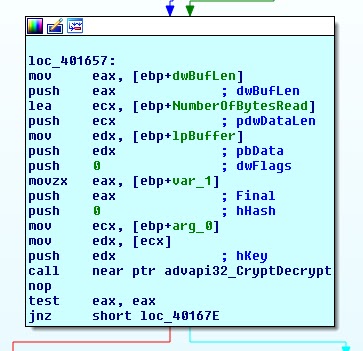
The only difference between them is that CryptEncrypt takes an extra parameter at the end. Since this will be pushed first onto the stack before the function is called, we can leave everything as is and just change the call to CryptDecrypt instead. The function now looks like this:


We put the doc file in the Briefcase folder and run the program again. Apart from the ransomware background, we get the result:


CTF Writeup - Flare-On 2016 - 01: challenge1


  • Name - challenge1
  • Category - Reverse Engineering
  • Points - 1
  • Description - n/a
  • Binary - Download here

Running the PE binary and giving it "1234567890" as input:

Command Prompt
C:\>challenge1.exe Enter password: 1234567890 Wrong password C:\>


Loading it in IDA, we realise that there's a lot going on before we get to the part where the "Enter password:" string is displayed. All this can be disregarded as it's not affected by our input; everything happens in sub_11C1420():


Only 2 functions (sub_11C1260() and sub_11C2C30) are called before the final branch is taken. Let's start with the one that's encountered first. This function takes 2 parameters, the number of bytes in our input, and the input itself. For each iteration of the inner main loop, the function takes 3 characters from our input, loads them into EAX (annotated in the image), does some operations on EAX and translates the characters from buffer byte_EF3000:


As seen in the image, the 3 bytes in EAX (3 chars from input) are shifted to the right by 18, 12, 6 and 0 bits before being translated. This means that each 3 characters from out input are mapped into 4 characters. At this point all alarms should start going off: the algorithm is Base64. If we let the algorithm finish, we get: JQFwKAR2Kwd5JZ==. Although we get what looks like Base64, it does not match the actual Base64 of our input '1234567890', which should be: MTIzNDU2Nzg5MA==. If we look at the translation buffer byte_EF3000, we notice something odd:


The index table has been mangled. So now we know what that the algorithm is a Base64 with a custom index table.

Moving on to the next function, sub_11C2C30, we get a char by char comparison of our (custom-)base64 output from the previous function and the string x2dtJEOmyjacxDemx2eczT5cVS9fVUGvWTuZWjuexjRqy24rV29q. As anticipated, if all the comparisons match, the program branches to the success message.

We create a small python program which reverts the resultant string back to the expected input using the custom base64 algorithm:


    import string
    import base64

    my_base64chars  = "ZYXABCDEFGHIJKLMNOPQRSTUVWzyxabcdefghijklmnopqrstuvw0123456789+/"
    std_base64chars = "ABCDEFGHIJKLMNOPQRSTUVWXYZabcdefghijklmnopqrstuvwxyz0123456789+/"

    result_string = "x2dtJEOmyjacxDemx2eczT5cVS9fVUGvWTuZWjuexjRqy24rV29q"

    result_string = result_string.translate(string.maketrans(my_base64chars, std_base64chars))
    answer = base64.b64decode(result_string)

    print answer


Using the result as the password:


Command Prompt
C:\>challenge1.exe Enter password: sh00ting_phish_in_a_barrel@flare-on.com Correct! C:\>

Monday, 29 August 2016

CTF Writeup - IceCTF 2016 - A Strong Feeling (RE 80)


  • Name - A Strong Feeling
  • Category - Reverse Engineering
  • Points - 80
  • Description - Do you think you could defeat this password checker for us? It's making me real pissed off!
  • Binary - Download here

Running the 64-bit ELF and giving it "some_random_input" as the input string:

root@kali: ~/Desktop
root@kali:~/Desktop# ./a_strong_feeling some_random_input Haxx0r ipsum gurfle deadlock exception ctl-c continue Dennis Ritchie. root@kali:~/Desktop#

Running the binary does not reveal anything about the expected input. Loading it in IDA, we're faced with a very complicated graph depicting the main function:


We notice that the last row of instruction blocks is predominantly made up of 2 different type of blocks. An example of each follows:


The red block outputs the Haxx0r message we got earlier whereas the green block contains a compare instruction for each of the characters in our input. Simply put, avoid the boxes with a call _printf instruction. This is done by providing the right character at each compare statement. If the comparison fails, we end up in a bad instruction block at the next round.

Putting breakpoints at each of the compare statements and noting the comparison character at each round, we end up with the flag:

root@kali: ~/Desktop
root@kali:~/Desktop# ./a_strong_feeling IceCTF{pip_install_angr} Wooooohoooo! root@kali:~/Desktop#